
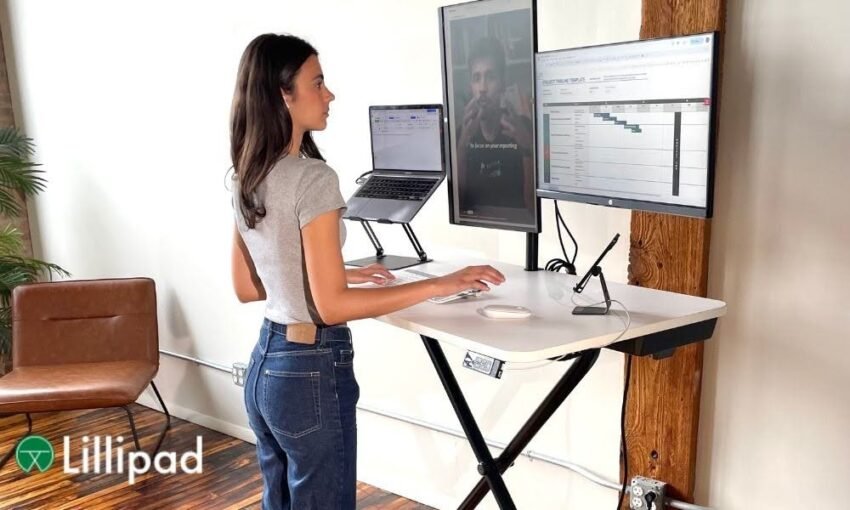

A sit-stand workstation is only as effective as the accessories built around it. The desk itself handles height adjustment, but without supporting hardware, most users develop the same posture problems they were trying to avoid. A monitor positioned too low forces neck flexion whether sitting or standing. A hard floor cuts standing sessions short within 90 minutes. Cables that snag during height changes become a daily frustration. This guide covers the accessories that have measurable biomechanical support behind them and explains exactly what each one solves.
Why Accessories Matter as Much as the Desk Itself
A height-adjustable desk removes one fixed point from your workstation. It does not automatically create a neutral posture. Ergonomics requires a minimum of two adjustment points: the keyboard position affecting arms and wrists, and the monitor position affecting head, neck, and shoulders.
Workrite Ergonomics, an ergonomic research firm founded in 1991, states that a height-adjustable desk covers the keyboard height requirement but still needs a monitor arm to deliver the second adjustment point. Without both, users frequently crane their necks downward to read screens that do not rise with the desk. That single posture fault produces the same cervical strain that a fixed desk causes, regardless of how many times per day the desk height changes.
Anti-Fatigue Mat: The First Accessory to Add
Standing on a hard floor concentrates pressure in the heels and calves. Research published on PubMed by researchers at the University of Waterloo found that both foam and inflatable mat surfaces significantly reduced lower-body discomfort compared to a concrete floor during two-hour standing sessions. Participants on the mat surface also showed measurably better typing accuracy as standing duration increased.
A polyurethane anti-fatigue mat works by destabilizing the standing surface slightly, which forces the leg muscles to make continuous small corrections. This micro-movement improves blood circulation in the lower limbs and prevents the calf and soleus muscles from entering the static contraction that causes stiffness. For a sit-stand workstation, the mat should be positioned directly underfoot at standing height and removed or rolled aside when transitioning to seated work to keep the floor clear.
Monitor Arm: Non-Negotiable for Neck Posture
A monitor arm allows the screen to follow the user’s eye level across both sitting and standing positions. Without one, a monitor sitting on the desktop at a fixed height is too low when standing and often too high when seated on a standard chair.
The top of the screen should sit at or just below eye level in both positions, with the screen roughly an arm’s length away. Occupational health data consistently shows that aligning screens at this height can reduce neck flexion strain by up to 40%. The Lillipad sit to stand desk is compatible with Lillipad’s own single and dual monitor arms, both of which use a universal VESA 75×75 and 100×100 mounting plate. The quick-release mechanism on each arm allows the monitors to be detached in seconds when folding the desk for storage, which is a specific requirement for foldable workstations that fixed monitor arms do not account for.
Keyboard Tray: Wrist Angle at Both Desk Heights
A keyboard tray positions the keyboard slightly below desk surface level, allowing the wrists to remain flat or in a slight negative tilt. Without one, the keyboard sits on the desktop surface, which forces the wrists into a slight upward extension during typing.
Negative-tilt keyboard trays are the standard recommendation in occupational ergonomics because they align with the forearm’s natural resting angle. The ANSI/BIFMA Ergonomics Guideline G1-2013 specifies that keyboard height should allow elbows to rest at approximately 90 degrees with forearms parallel to the floor. On a sit-stand workstation, a keyboard tray that mounts under the desktop maintains this angle at both sitting and standing heights without requiring the user to manually recalibrate their position each time they change postures.
Cable Management: Safety and Functionality During Height Changes
Cables that hang loosely between a desk and wall outlets become taut at standing height and slack at sitting height. Over time, this repeated strain damages port connections, frays cable insulation, and creates tripping hazards on the floor.
The Lillipad sit to stand desk PRO model includes integrated cable concealment panels and a cable management net built directly into the frame. The built-in surge protector with 3 AC outlets, 3 USB ports, and 1 USB-C port keeps power sources at desk level rather than routing cables down to the floor. For desks without built-in management, adhesive cable clips spaced along the underside of the frame and a service loop of 12 to 18 inches of slack at every cable connection point prevents damage through the full height range of adjustment.
Ergonomic Chair: The Seated Half of the Equation
A sit-stand workstation improves posture during the standing portion of the day. The seated portion still requires a chair that supports lumbar curvature and adjusts to match the desk’s seated height.
A chair without lumbar support flattens the lumbar spine’s natural inward curve, which increases intervertebral disc pressure even at correct desk height. The chair seat height should place the thighs parallel to the floor with feet flat. When the desk drops to its seated position, the chair height should be checked to confirm that the 90-degree elbow angle is maintained. If the chair is set for correct seated posture but the desk height does not match, one of the two has to compromise. An adjustable desk and an adjustable chair used together allow both to be calibrated independently.
What Accessories Does a Sit-Stand Workstation Actually Need?
Priority order based on biomechanical impact:
- Anti-fatigue mat: Reduces lower-body discomfort and maintains circulation during standing intervals
- Monitor arm: Keeps screen at eye level across sitting and standing heights
- Keyboard tray: Maintains negative wrist tilt at both desk positions
- Cable management system: Prevents snag damage during height adjustment and eliminates floor clutter
- Ergonomic chair: Supports lumbar curve during seated intervals to complete the postural benefit
- Footrest: Optional for seated use when the chair height cannot drop low enough to keep feet flat on the floor
Wikipedia defines the field as designing systems to fit human use rather than requiring humans to adapt to systems. Each accessory on this list applies that principle to a specific body region. A sit-stand workstation without supporting accessories shifts the workload of adjustment onto the user’s body rather than the equipment, which produces fatigue rather than preventing it.